

An orthopaedic surgeon website needs seven pages: a home page that says who you treat and where, a page for each condition, a page for each procedure, an about page, a fees and insurers page, a locations and booking page, and a patient FAQ page. Between them, they answer what a patient checks before booking.
The seven pages at a glance
| Page | What it does for the patient | What it does for search and AI |
|---|---|---|
| 1. Home page | Confirms in seconds that you treat their problem, near them | Ties your name to your subspecialty and location |
| 2. Condition pages | Explains their problem in words they recognise | Ranks for symptom and condition searches |
| 3. Procedure pages | Sets out benefits, risks and recovery before they meet you | Gives AI assistants a detailed source to cite |
| 4. About you | Shows your training and registration | Confirms who you are, with details that can be checked |
| 5. Fees and insurers | Tells them what it costs and whether they’re covered | Answers cost searches self-pay patients make early |
| 6. Locations and booking | Shows where you practise and how to book at each site | Matches your details across Google and directories |
| 7. Patient FAQs | Answers the questions they’d ask in clinic | Supplies short, self-contained answers AI can quote |
1. A home page that says who you treat and where
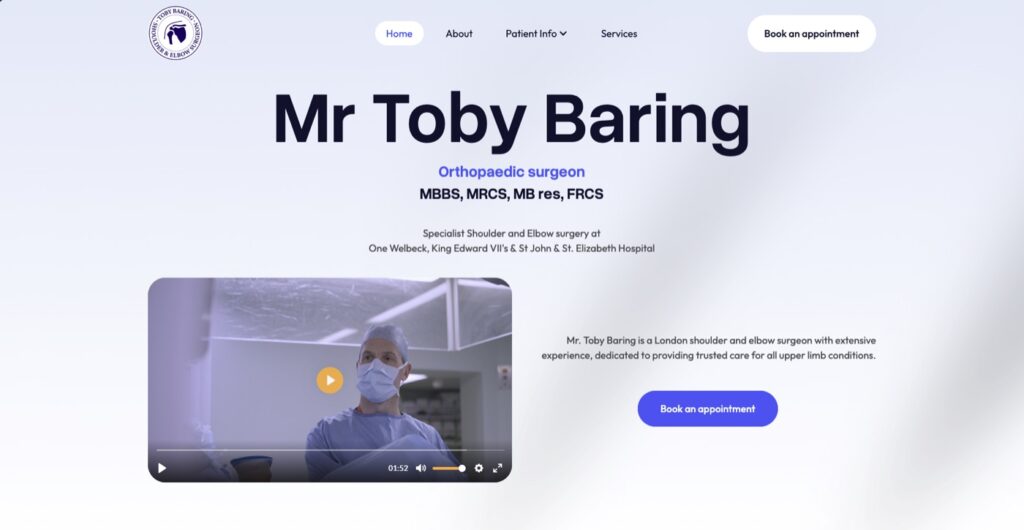
What it’s for: a patient lands on your home page from a search, a GP letter or a hospital profile. In the first screen, they need to see your specialty, the problems you treat and where you practise.
What goes on it:
- Your name, title and subspecialty in the first line, such as Consultant orthopaedic surgeon specialising in shoulder and elbow surgery
- The main conditions you treat, each linking to its own page
- Every hospital and clinic you work at, by name and town
- A clear route to book or enquire
- A real photograph of you, not a stock image
Common mistake: opening with a slogan or a long biography. A patient who can’t tell within a few seconds whether you treat knees or shoulders goes back to the search results.
2. A page for each condition you treat
What it’s for: patients usually search for their symptom before they search for a surgeon. A page per condition is how your site appears for those searches. Our orthopaedic surgeons page sets out which conditions matter most in each subspecialty.
What goes on it:
- The patient’s term and the clinical term together, such as frozen shoulder (adhesive capsulitis) or tennis elbow (lateral epicondylitis)
- Symptoms, causes and how it’s diagnosed
- Non-surgical options as well as surgery, with links to the relevant procedure pages
- When a patient should see a specialist
- Your name and a reviewed date on the page
Common mistake: one Shoulder conditions page covering ten problems in a paragraph each. It ranks for none of them. Each condition needs its own page that answers one question well. In a March 2026 study, Ahrefs found that 38 percent of Google AI Overview citations came from pages in Google’s top 10, and about another 31 percent from pages in positions 11 to 100. A focused page can be cited even before it reaches the top of the results.
3. A page for each procedure, with risks and recovery
What it’s for: a patient considering surgery reads this page closely. They want to know what happens, what could go wrong and how long until they can drive or go back to work.
What goes on it:
- What the procedure involves, in plain English
- Who it’s suitable for, and who it isn’t
- Risks and complications, set out alongside the benefits
- A realistic recovery timeline, with a source for any figures
- Alternatives, including not operating where that’s reasonable
Common mistake: describing surgery as simple, routine or quick to recover from, with the risks left out. The GMC requires what you publish about your services to be factual and possible to check (Good Medical Practice 2024 [VERIFY: confirm the 2024 paragraph number and wording; paragraph 70 is the 2013 numbering]), and a one-sided page is hard to square with that.
4. About you, with your registration and training
What it’s for: patients, GPs and insurers check who you are before they refer or book. Google’s guidance on helpful, reliable content says Google gives more weight to content showing strong expertise and trust on topics that could affect people’s health. It also asks whether bylines lead to background about the author.
What goes on it:
- Your GMC number and a link to your entry on the GMC register
- Your specialist registration, described exactly as it appears on the register
- Where you trained, including fellowships
- Your NHS post, if you hold one
- Professional memberships and any research or teaching
Common mistake: calling yourself a specialist in an area the register doesn’t support, or listing every course you’ve attended. Keep it accurate and short enough to read in full.
5. Fees and insurers
What it’s for: self-pay patients compare costs early, and insured patients want to know you’re recognised by their insurer. Under the CMA’s Private Healthcare Market Investigation Order, consultants already send their outpatient consultation fees and standard procedure fees to PHIN, and write to patients with estimated costs before a consultation. The figures on your fees page should match what PHIN shows.
What goes on it:
- Initial and follow-up consultation fees for self-pay patients
- Fees or fee ranges for the procedures you do most, and what each includes
- What’s charged separately, such as the hospital, the anaesthetist and imaging
- The insurers you’re recognised by
- A link to your profile on PHIN
Common mistake: a page that says please contact us for fees. It can send self-pay patients elsewhere. Discounts or time-limited offers on treatment don’t belong on this page either.
6. Locations and booking
What it’s for: if you work at more than one hospital, each one usually books differently. This page tells a patient where you see people and exactly how to book at each place.
What goes on it:
- Every hospital and clinic, with full address and a map
- The booking route for each, such as your secretary, the hospital’s central booking team or an online system
- Which days you’re at each site
- Parking, accessibility and public transport notes
- The same name, address and phone details you use on Google Business Profile and directory listings
Common mistake: one generic contact form for every site, or a hospital you stopped working at two years ago still listed. Out-of-date details on your website and directory profiles send patients to the wrong place. They also give AI assistants conflicting facts about you.
7. Patient FAQs
What it’s for: patients have the same questions before most consultations, about referrals, waiting times, what to bring and recovery. Short answers on your site save your secretary time, and they’re the format AI assistants quote.
What goes on it:
- Whether a patient needs a GP referral
- What happens at a first appointment
- How self-pay and insured routes differ
- Questions specific to your subspecialty, such as when can I drive after a knee replacement?
- Each answer complete on its own, in two to four sentences
Common mistake: writing FAQs the practice wants to answer rather than ones patients ask. Your secretary’s inbox is the best source of real questions.
If you add patient testimonials, the ASA treats claims made in them as claims you must be able to back up (CAP Code guidance on testimonials). Before and after images, X-rays included, are claims too, and the GMC requires what you publish to be factual and possible to check (Good Medical Practice 2024). This is general guidance, not legal or regulatory advice.

What about reviews and before and after images?
In my experience: Sam Stratton
The page I’d add first on most orthopaedic sites is a proper condition page for the problem the surgeon most wants to treat. Many sites list procedures and stop there. Patients search for their knee pain or their stiff shoulder long before they search for an operation, and a site without condition pages is missing at that stage.
Frequently asked questions
What pages should an orthopaedic surgeon website have?
Seven: a home page saying who you treat and where, a page for each condition, a page for each procedure, an about page with your registration and training, a fees and insurers page, a locations and booking page, and a patient FAQ page.
How many condition pages does an orthopaedic surgeon need?
Start with the conditions you most want to treat. For a single subspecialty, we’d suggest five to ten. A few thorough pages do more for patients and search than many thin ones.
Should a private orthopaedic surgeon publish fees online?
In most cases, yes. Consultants already supply consultation and procedure fees to PHIN under the CMA’s Private Healthcare Market Investigation Order, and most are shown on PHIN’s website. Publishing them on your own site, with what each fee includes, helps self-pay patients decide before they enquire.
Do I need separate condition and procedure pages?
Yes, if you can. A condition page answers a patient who knows their symptoms but not the treatment. A procedure page answers one who has been told they may need surgery. They search differently, so separate pages, linked to each other, can each appear for the right searches.
Does my website need to show my GMC registration?
It should. Your GMC number and a link to your register entry let patients, GPs and insurers confirm your specialist registration in a few seconds. Describe your specialty exactly as the register does, so nothing on your site implies broader expertise than you hold.
Our website design service builds orthopaedic sites around condition and procedure pages. If you already have a hospital profile and are deciding whether you need more, our comparison of your own website vs a hospital profile covers that.
Want to see which of the seven your site has? We’ll check your current website against this list, look at how you appear in Google and AI assistants, and send you a plain-language summary. It’s an assessment, not a sales call. Request a free audit.